Essential Points
- A full node verifies every block and every Bitcoin transaction itself, without you having to rely on an external explorer.
- Setting it up is quick, but syncing about 600 GB of blockchain takes days, not minutes, according to bitcoin.org.
- If you're short on space, a pruned node works with as little as 10 GB, in exchange for not keeping the entire history.
- Opening port 8333 helps the network and exposes your computer: keep it updated and don't store important keys on it.
Setting up your Bitcoin node requires only a few steps, but one of them can't be done in 10 minutes: the initial synchronization. According to bitcoincore.orgA full node downloads about 600 GB of data the first time and adds between 5 and 10 GB each month, so the clock is set by your connection and your disk, not this guide.
A Bitcoin node is a program, usually Bitcoin Core, that stores a complete copy of the chain of blocksIt independently verifies each transaction and each new block, and forwards what complies with the rules to other nodes. Thanks to this, when you receive bitcoins, you don't depend on an external block explorer to confirm that the payment is real: you verify it yourself.
The good news is that you don't need a powerful machine. official guide to bitcoin.org It sets the minimum at 2 GB of RAM and an upload speed of 400 kilobits per second, but what really matters is disk space and the number of hours you leave it running. Before starting, it's a good idea to decide whether you want a full node or a pruned one, what equipment you'll dedicate to it, how many hours a day it can be on, and how you'll protect your home network, because each of these decisions changes the experience from beginning to end.
 Certificate

Why are Bitcoin nodes important?
Bitcoin requires more than just miners to function. Miners propose blocks, but it's the full nodes that independently verify that each block meets the consensus rules: valid signatures, no errors. double-spending and the currency's issuance limit. If a block violates even one rule, each node rejects it on its own, without consulting anyone, as described in the bitcoin.org guide.
If you haven't already, I recommend reading the article about it. 51% attack To see what a majority of the mining power can and cannot do: it can reorder recent blocks, but it cannot force nodes to accept forged signatures or coins created out of thin air. The more independent nodes that verify the rules, the harder it is for something illegitimate to slip into the network.
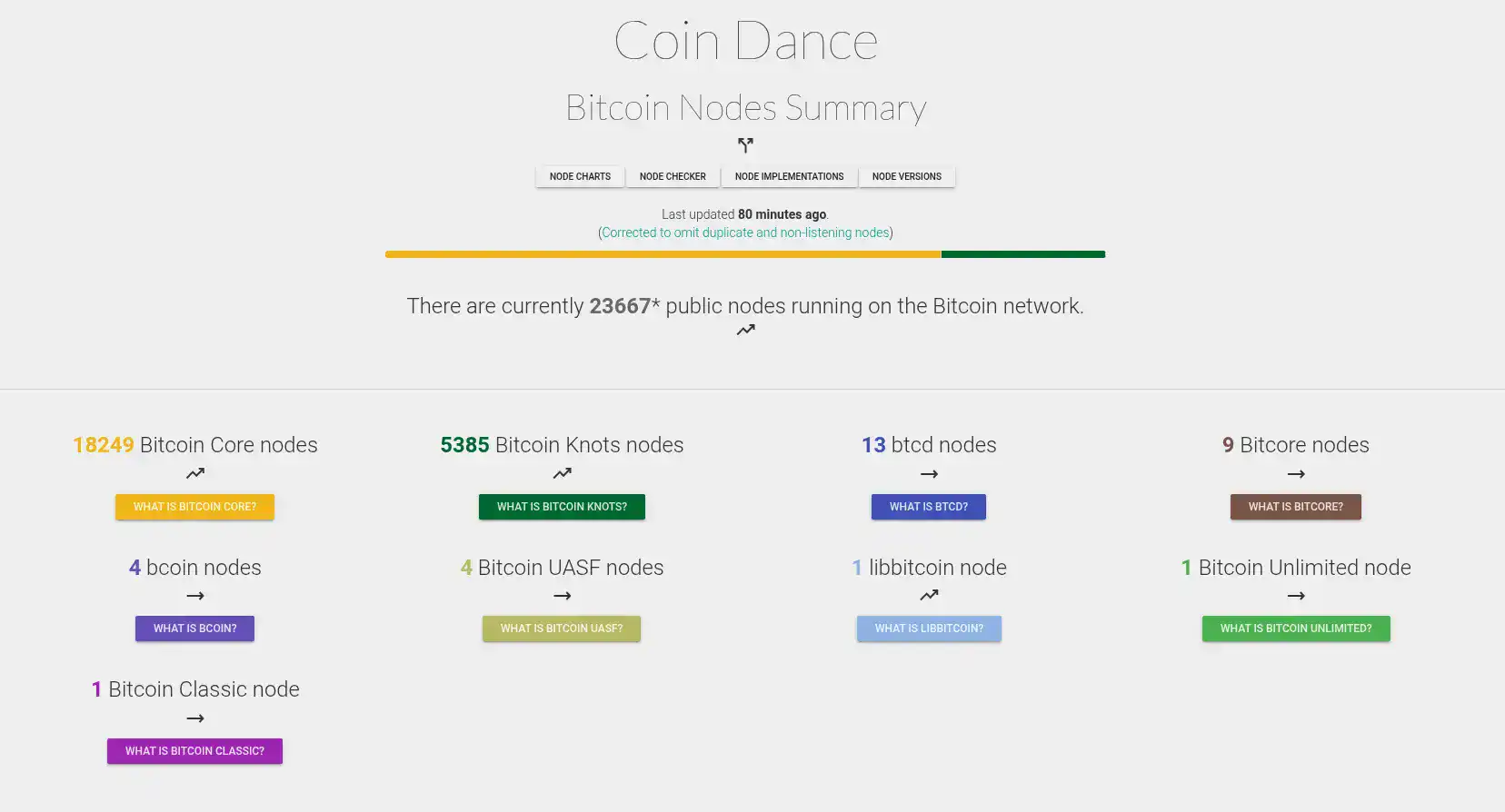
The chart shows Bitcoin node statistics published by Coin Dance in March 2026, meaning the data is seven months old at the time of writing. It gives you a general idea of the network's distribution, but for current node counts, you should consult Coin Dance's website directly.
A Bitcoin node can perform several roles depending on its use, and it's best not to confuse them: the node validates and propagates, the wallet stores your keys and signs transactions, and the miner proposes new blocks. These are the most common roles:
- The full node downloads and validates the entire blockchain from the first block, and is the one that explains the rest of this guide.
- The pruned node still validates, but deletes the old blocks and keeps only the most recent ones to save disk space.
- Mining equipment needs a full node to tell it which transactions are valid, although not every node mines.
- Lightning connects to a Bitcoin node, either its own or a third party's, to operate its payment channels.
Mount your Bitcoin node
The setup—downloading the program, launching it, and opening a port—can be done in under 10 minutes. The initial synchronization, during which your computer downloads and verifies the entire blockchain, takes significantly longer, and bitcoin.org warns that this process can take several days if your disk or internet connection is slow.
While syncing, your computer remains usable, although you'll notice the disk and connection are very busy, so many people leave it running overnight. Also, disable sleep mode on Windows or macOS, because each interruption lengthens the process and can leave the node idle without you realizing it.
Pre-installation requirements
You need Bitcoin Core, the project's reference program, installed on your operating system. As of October 30, 2026, bitcoincore.org It lists version 32.1 as the latest and recommends verifying the installer's hash and signature before running it. If you've never used this wallet, you can consult our article dedicated to those who start from scratch.
The figures in the table come from bitcoincore.org and the bitcoin.org guide, consulted in October 2026. The first two rows show the official minimums and the last one adds an editorial recommendation to prevent synchronization from taking forever.
| Profile | Disc | RAM | Connection | For whom |
|---|---|---|---|---|
| Full node (official minimum) | About 600 GB and 5-10 GB more each month | 2 GB | Upload speed of 400 kilobits per second and 6 hours per day | Who wants to validate the entire chain themselves |
| Pruned node (official minimum) | From about 10 GB | 2 GB | The same as the complete node | Computers with limited storage capacity |
| Recommended equipment for synchronization without waiting | 1 TB SSD | 8 GB | Fiber or a fast connection | Who wants a permanent node at home |
Apart from the table, keep in mind four practical conditions mentioned in the official guide or that can be deduced from it, because these are the ones that cause the most problems once the node is already up and running:
- A computer with a recent version of Windows, macOS, or Linux.
- A disk with read and write speeds of at least 100 MB/s, which gives an SSD an advantage over a mechanical hard drive.
- Availability of at least 6 hours a day with the node open, ideally you leave it on all the time.
- The device's sleep mode is disabled to prevent it from interrupting synchronization.
Also, keep an eye on your data traffic. According to bitcoin.org, after synchronization, downloads are around 20 GB per month, and uploads can exceed 200 GB per month on fast connections. Some providers charge for excess data or limit users, so check your plan before leaving the node open 24/7.
Steps to follow
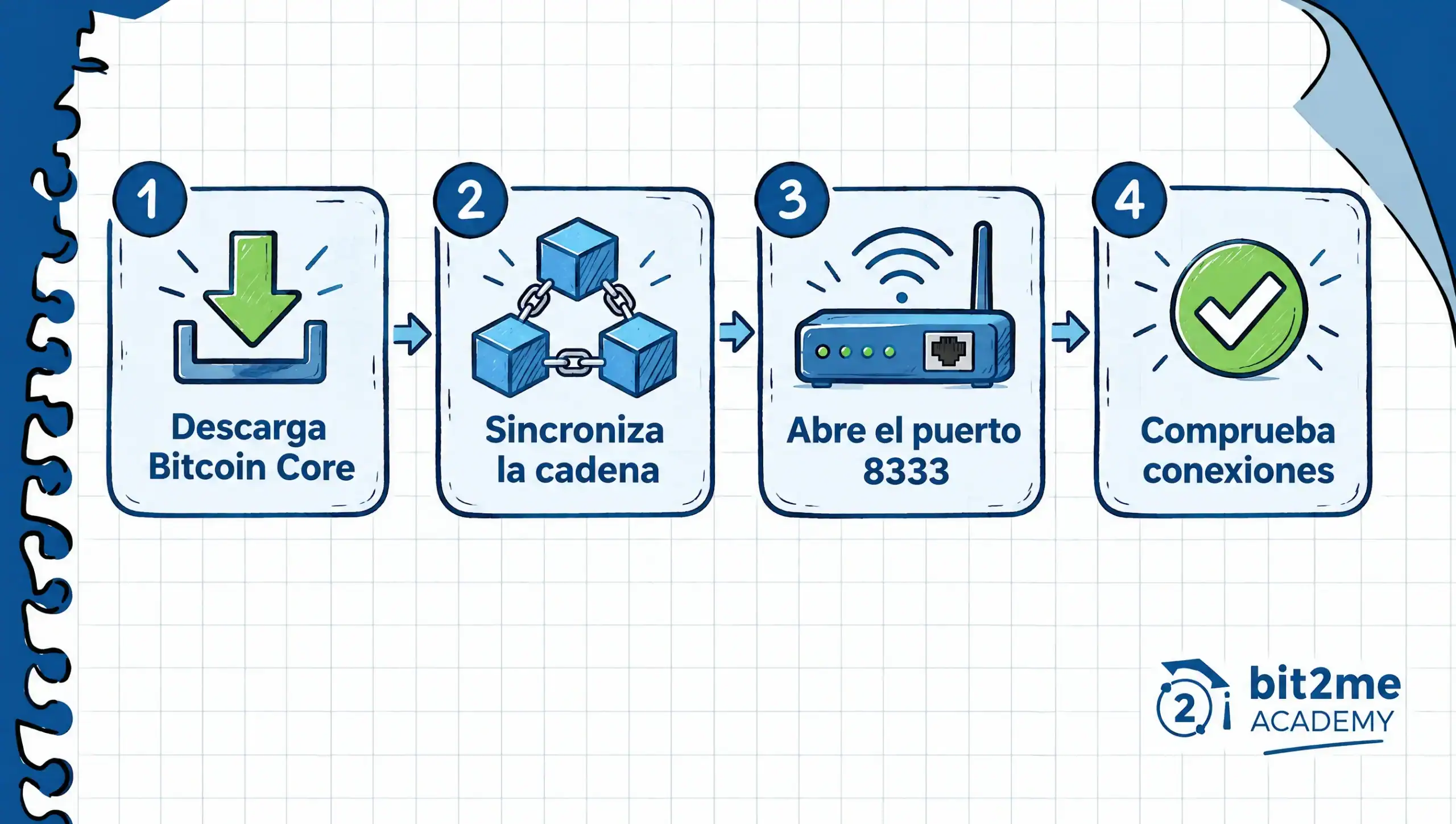
I'll explain the process using a home computer, which is the most common scenario, and below you'll see the alternative for a server. There are four steps, and the order matters: the final check only makes sense once the node has finished synchronizing, as recommended by the bitcoin.org guide.
- Download Bitcoin Core from bitcoincore.orgCheck the installer hash with your system's tool (certUtil on Windows, shasum on macOS, or sha256sum on Linux) and run it.
- Open the program and let it download and verify all the blocks until it reaches 100%. The first time, it downloads the entire chain, about 600 GB, and you'll know it's finished when the verification checkmark appears at the bottom of the wallet.
- Direct your router's TCP port 8333 to your computer's internal IP address, as explained below.
- Restart your router and Bitcoin Core, wait a few minutes, and check that you have incoming connections.
Be wary of commands that are downloaded and executed all at once, such as curl ... | shThey execute whatever is at that address on your computer at that moment, and if the site changes ownership or is tampered with, the code is already running with your permissions. Always download the official installer and verify its hash.
To open the port, access your router's control panel by typing its address into your browser. This is usually 192.168.1.1 or 192.168.0.1. Look for the "Port Forwarding" or "Port Redirection" section, depending on your router model. Bitcoin Core attempts to configure the router automatically upon startup, but many models don't allow this, so you'll need to do it manually using these values:
| Countryside | Price |
|---|---|
| Service | Bitcoin (node) |
| Port | 8333, both external and internal |
| Dance | TCP |
| Internal IP | Your computer's internal address |
To find out that internal IP address, run ipconfig In the Windows command prompt, open macOS network settings or type ip a in the Linux terminal. It's advisable to reserve it on the router, with a DHCP reservation, so that it doesn't change upon reboot, because if it changes, the redirection points to a device that no longer exists and your node will again be left without incoming connections.
To verify that everything is working, open the debug window in Bitcoin Core and look at the Information tab, where the number of incoming connections is displayed, or hover your cursor over the signal icon in the bottom right corner. If you prefer the console, these two commands will tell you how many connections you have and which ones are incoming:
bitcoin-cli getconnectioncount
bitcoin-cli getpeerinfo
The bitcoin.org guide considers a score higher than 10 in getconnectioncount This indicates that your node accepts incoming connections, and in getpeerinfo You can search for pairs using the field inbound If you don't see any, check the port forwarding and reserved IP address before touching anything else.
A node doesn't mine, so it doesn't do intensive computing: the disk and the network do the work. That's why many people run it on a modest machine, like a Raspberry Pi-type board with an external SSD, without needing a PC tower. If you're interested in the difference with mining, you can find more details in the article about What is bitcoin mining?.
Launch a node on a server
If you don't want to leave your computer on, you can run the node on a virtual or dedicated server. The limiting factor isn't processor power, but storage, because you need space for around 600 GB of chain storage plus monthly growth, and bandwidth, since uploads can exceed 200 GB per month. The cost depends on the provider, so compare plans with these two factors in mind.
On a server directly connected to the internet, according to bitcoin.org, you typically don't need to configure anything special to accept incoming connections. Install Bitcoin Core just as you would on your computer, verify the hash, and follow the instructions. official instructionsThese guides explain the process in detail for Linux. Keep your system updated and close any unused ports.
Full node or pruned node, which is better for you?
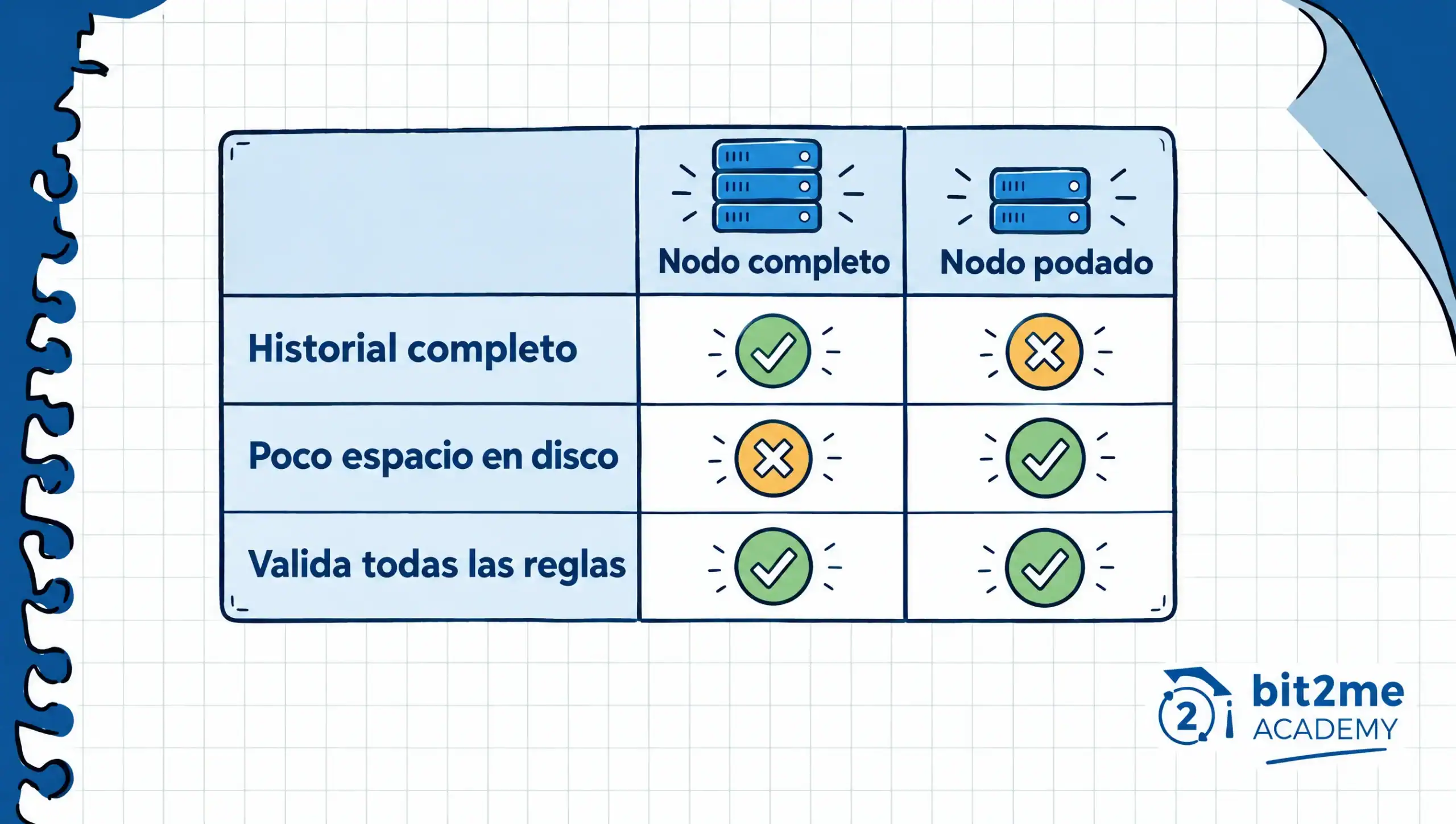
A pruned node validates exactly the same as a full node: it downloads all blocks and checks all rules, but then deletes the oldest ones and keeps only the most recent. According to bitcoincore.orgYou can keep as little as 10 GB on the disk, compared to about 600 GB for the full node, which opens the door to small teams.
Pruning is activated with the option prune=Nwhere N is the MiB you reserve for blocks, and the minimum non-zero value is 550 according to bitcoin.org. Before using it, be aware of its limitations: it is not compatible with -txindex not even with -rescanand disables the command importwalletSo it won't be useful if you need that type of consultation.
What you sacrifice is the history: a pruned node doesn't retain older blocks, so you can't access them from it. Choose the full option if you have a large SSD and want the entire chain readily available, and the pruned option if your disk is small and you only need to validate your own transactions.
If you're considering a Raspberry Pi, the deciding factor is storage: with a sufficiently large external SSD, you can run a full node, while with a small board, you'll only be able to run a pruned one. Memory matters less than it might seem, because the official minimum is 2 GB, and what makes the biggest difference during synchronization is disk speed.
How to protect your node and connect it to your wallet?
Opening port 8333 allows other nodes to connect to yours, which helps the network, but it also exposes your computer to incoming connections from unknown sources. The bitcoin.org guide warns that attackers target Bitcoin Core users and can affect other functions on the same computer, so keep your system and Bitcoin Core up to date.
For this reason, it's best not to store private keys on the node's computer that you don't need there, and to use a static local IP address. If you don't need to receive connections, you can leave the port closed and have the node only connect outbound: it will still validate everything, although it will contribute less to the network, because bitcoin.org states that supporting it requires allowing incoming connections.
If you're concerned about privacy, Bitcoin Core can route your connections through Tor. According to the official project documentation, with -proxy You're pointing to a Tor proxy, like 127.0.0.1:9050And with -onlynet=onion You limit outgoing connections to .onion addresses. When using -proxy Listening is disabled by default, and you will need to enable it with -listen if you want to accept entries.
Once synced, you can use the built-in Bitcoin Core wallet, which, according to bitcoin.org, is secure as long as you take the usual precautions you would with any Bitcoin wallet. If you later want to trade with Lightning, lnd It supports Bitcoin Core as its on-chain engine, and if you don't yet have bitcoins to open a channel, you can buy Bitcoin at Bit2Me.
Current state of Bitcoin nodes in 2026
The data for a node changes with each version and with each block, so this table summarizes what official sources were saying on October 30, 2026. The bitcoin.org guide may be behind bitcoincore.org: some of its figures, such as the 740 GB initial download, are older than those currently published by the project.
| Date | Value as of October 30, 2026 | Source |
|---|---|---|
| Latest version of Bitcoin Core | 32.1 | bitcoincore.org |
| Initial download of a full node | About 600 GB | bitcoincore.org |
| Monthly growth of the chain | Between 5 and 10 GB | bitcoincore.org |
| Space of a pruned node | From about 10 GB | bitcoincore.org |
| Minimum requirements from the bitcoin.org guide | 2 GB of RAM and an upload speed of 400 kilobits per second | bitcoin.org |
Checking directly on bitcoincore.org and the Bitcoin Core repository on GitHub is more reliable than any figure in an article, including this one. If the version you see there is newer than 32.1, install the new version and review the release notes before updating an existing node.
A unique node, from theory to practice
Once you've set up your Bitcoin node, the work isn't over: you still need to connect your wallet, keep an eye on the disk to prevent it from filling up, and update Bitcoin Core when a new version is released. A node left unattended for months stops contributing to the network and can fall behind the current rules, which is the exact opposite of what you wanted to achieve when you set it up.
The reward is less tangible than a balance: you see with your own eyes that the rules are being followed, and you stop depending on what a third party tells you. If your hardware isn't up to a full node, a pruned one already gives you that verification, and from there you can decide how close you want to get to Lightning or other uses.

Frequently asked questions about setting up a Bitcoin node



 Author